


|
Name |
App Cloner Premium |
|---|---|
|
Google Play Link |
GET IT ON
Google Play
|
|
Category |
Libraries & Demo |
|
Developer |
AppListo |
| Last version | 3.6.2 |
|
Updated |
|
|
Compatible with |
Android 4.1+ |
Introduction to App Cloner Premium APK
App Cloner Premium is an Android tool app made for users who want to create separate copies of apps on the same device. It helps you run multiple versions of supported apps with different names, icons, settings, and account data. This makes it useful for people who manage personal, work, testing, or backup setups without mixing everything together.
The main purpose of App Cloner Premium is app duplication. A cloned app works as a separate installation, so you can sign in with another account or adjust its behavior without changing the original app. This is handy for messaging apps, social platforms, productivity tools, and apps you want to test safely before using them as your main version.
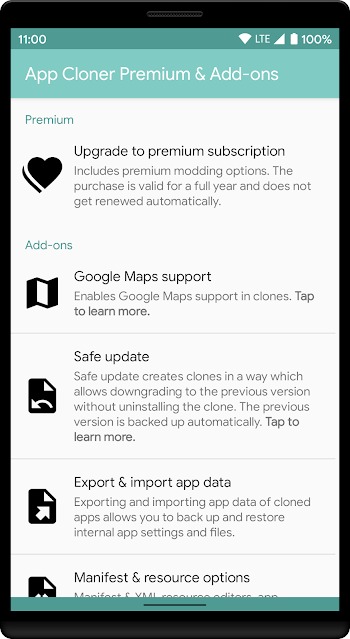
App Cloner Premium also gives users many customization options. You can rename a clone, change its icon, adjust permissions, control startup behavior, and set privacy-related options for each copy. Some clones can also use different device settings, location behavior, or interface tweaks, depending on the app and the available features.
The biggest advantage is convenience. Instead of constantly logging out and logging back in, you can keep separate app copies ready to use. A student could separate school and personal accounts. A small business owner could manage client profiles. A developer or tester could check how an app behaves under different settings. Less account juggling means fewer tiny headaches, and your thumbs will probably thank you.
Privacy control is another useful part of App Cloner Premium. Since each clone can hold its own data and permissions, users get more control over how apps interact with the device. This can help keep work, personal, and testing activity more organized. Still, privacy depends on how the app is configured, so users should review every permission instead of tapping through like a speedrun.
There are some limitations to know. App cloning does not work perfectly with every Android app. Some apps may block cloning, fail to launch, lose certain features, or stop working after updates. Banking apps, streaming services, games with anti-cheat systems, and apps that depend heavily on Google services may be harder to clone. Installing APK files from unsafe sources can also create security risks, so users should be careful and rely on trusted sources.
App Cloner Premium is most suitable for Android users who need multiple accounts, separate app spaces, app testing, or stronger organization on one device. It fits people who want control over cloned apps without rooting their phone. It is less suitable for users who only need basic dual-account support, since many Android phones already include built-in cloning tools for common apps.
FAQs App Cloner Premium
What is App Cloner Premium?
+
App Cloner Premium is an Android utility app that creates separate copies of supported apps. Each clone can have its own name, icon, settings, permissions, and account data.
What is App Cloner Premium used for?
+
It is used to run multiple versions of an app on one Android device. This helps users manage different accounts, test app behavior, separate work and personal use, or keep backup versions.
Can App Cloner Premium clone every Android app?
+
No. Some apps may block cloning or lose features after being copied. Apps with strict security systems, banking tools, streaming apps, and apps tied closely to Google services may not work properly.
Is App Cloner Premium useful for privacy?
+
Yes, it can help separate app data and permissions between clones. Users still need to check settings carefully, because privacy depends on how each cloned app is configured.
Who should use App Cloner Premium?
+
It is useful for people who manage multiple accounts, testers who need separate app setups, small business users, and Android users who want more control over cloned apps without rooting their device.
Discover More Interesting Apps

Share Your Thoughts